WhatsApp Sound Stickers Roll Out on Android
WhatsApp has started rolling out sound stickers on Android. The feature lets users send stickers that play short audio clips on tap. As a result, this marks the app's biggest sticker upgrade in years.
The introduction of audio-enabled stickers brings a new dimension to daily messaging on the platform. Millions of people rely on the application for personal and professional communication. By blending visual graphics with short sound bites, the platform aims to make chats more expressive. This update changes how contacts share inside jokes, musical clips, and personalized voice messages.
How to Create Sound Stickers on Android
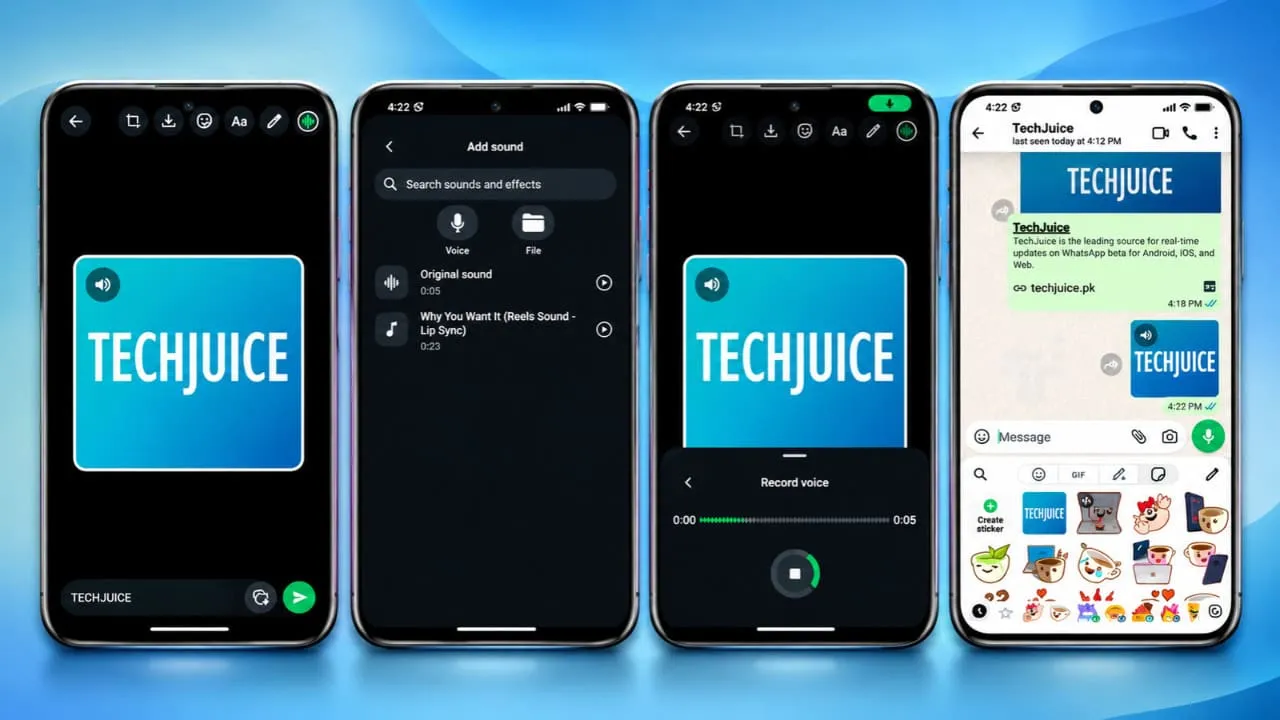
Users can now create sound stickers from both still images and videos. For image-based stickers, a new sound wave icon appears in the creation toolbar. Tapping it allows users to record their voice or attach an audio file. However, audio clips max out at 10 seconds for image-based stickers.
Meanwhile, video-based stickers work slightly differently. The tool automatically retains the first five seconds of a video's original audio. Additionally, users can replace that audio with a custom voice recording or another file from storage.
The creation process is built directly into the app interface. Creators do not need third-party applications to convert media files into compatible formats. The tool handles the conversion internally before adding the sticker to the personal collection.
How Sound Stickers Work in Chats
In the chat, sound stickers look just like regular ones at first glance. However, an audio icon appears on the sticker to signal it contains sound. Recipients then tap the volume icon to play the attached clip. In fact, the audio does not autoplay at all.
This manual activation design prevents unexpected noises in public spaces or quiet environments. Users maintain complete control over when they hear the embedded media. The system relies on user interaction to trigger playback every single time.
Audio Settings and Device Controls
WhatsApp also respects device audio settings with this feature. If a phone is in silent mode, sound stickers play without any audio. Furthermore, users can manually mute individual sound stickers by tapping the volume icon. The app then remembers that mute preference until the user changes it.
These controls ensure that messaging remains polite and manageable. People who dislike audio elements in text chats can silence specific stickers permanently. The app stores these preferences locally to maintain user intent across different chat sessions.
Security and End-to-End Encryption
In addition, both the sticker and its audio track receive end-to-end encryption. This keeps the feature in line with WhatsApp's broader privacy framework.
Security remains a core pillar for the messaging service as it introduces multimedia enhancements. End-to-end encryption ensures that third parties cannot intercept the audio clips during transmission. Only the sender and the intended recipient can decode and access the transferred media files.
Additional Design Changes and Future Updates
Alongside sound stickers, WhatsApp is also rolling out a toggle to remove automatic sticker outlines. This option now appears directly in the sticker creation toolbar. Moreover, the app is testing a redesigned compose box layout. It places the text field on top with emoji, attachment, and camera controls in a strip below.
WhatsApp previously removed its avatar stickers feature after users did not widely adopt it. As a result, sound stickers represent a fresh attempt at making the format more engaging. However, WhatsApp has not confirmed when the feature will reach iOS, WhatsApp Web, or desktop apps. The feature first surfaced in beta versions 2.26.41.3 and 2.26.41.11.