Apple Tests New Lock Screen Widgets for the iPhone Duo Cover Screen
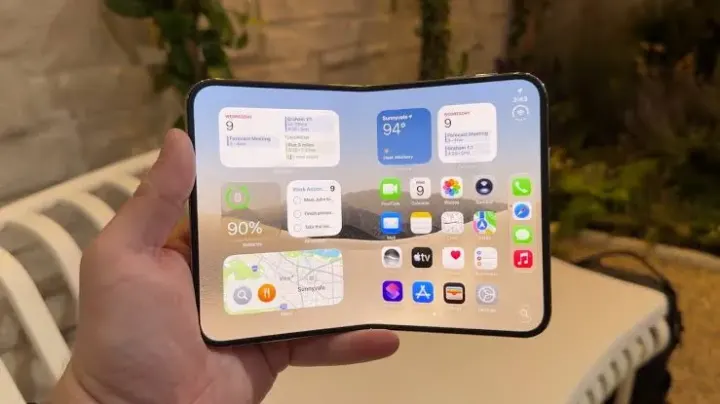
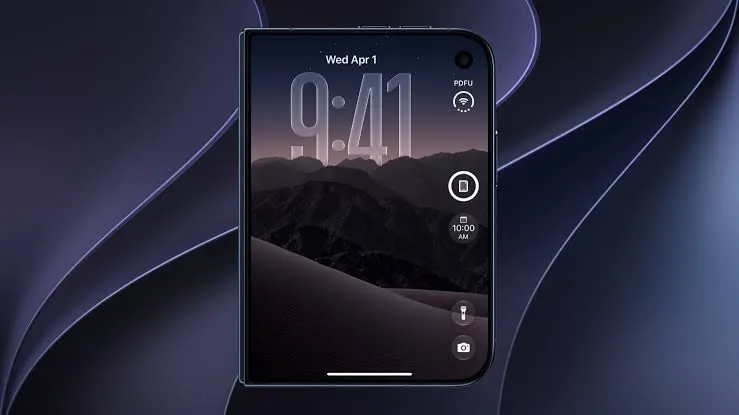
Apple could bring new Lock Screen widgets to the iPhone Duo through a future software update. The foldable currently supports two customizable shortcuts on its lock screen. However, a new leak suggests Apple is testing additional widget options.
The source shared the findings on X, including a video showing the feature in action. According to the leak, Apple has tested a new feature called a "complication column." It can display up to two widgets on the cover screen.
Apple has tested a “complication column” for iPhone Duo’s Lock Screen. It fits two circular widgets along the right edge. Flag: SpringBoard/Ionic (disabled). First seen in iOS 27.1, with no code changes since. https://t.co/orjOuvM1Xs
— pdfu (@itspdfu) November 22, 2026
The widget column would appear below the network status indicators on the right side of the cover screen. It was first spotted in iOS 27.1, although the feature remained disabled. The tipster also claims that a "Springboard/Ionic" setting controls the widget column.
Understanding the iPhone Duo Foldable Device and Cover Screen Functionality
Foldable mobile devices have changed how manufacturers approach secondary displays, often called cover screens or external screens. These outer panels let users handle quick tasks without unfolding the main interior panel. Apple entered this space with the iPhone Duo, offering users a compact external display for daily interactions.
Currently, the iPhone Duo supports two customizable shortcuts on its lock screen. Users rely on these shortcuts for rapid access to frequently used tools, such as the camera or flashlight. Expanding this setup with widgets changes the utility of the outer display entirely, bridging the gap between simple shortcuts and glanceable information.
Industry analysts note that external display utility remains a primary selling point for folding phones. Competitors in the mobile market already offer extensive widget support on outer screens. Adding deeper customization aligns with user expectations for modern smartphone interfaces.
How the Leak Revealed the New Complication Column Feature
Information about the potential update surfaced through social media platform X. A source shared details alongside a video demonstrating the functionality in a testing environment. This visual evidence offered a clear look at how the interface might behave upon release.
The leak highlighted a specific addition known internally as a "complication column." This layout element is designed to hold up to two widgets directly on the cover screen. Complication is a traditional term used in watchmaking and digital interfaces to describe small functional displays of data like weather or battery levels.
Technical digging into software code revealed that the widget column was first spotted in iOS 27.1. Despite its presence in the software package, the feature remained disabled for regular users. Software investigators found that a specific "Springboard/Ionic" setting controls whether the widget column appears.
Current Status of Development and Code Updates in iOS
While the discovery points to active experimentation within Apple engineering teams, the timeline for release remains uncertain. Apple has not updated the related code since iOS 27.1. This stagnation leaves questions about whether the company is still working on the feature or if it has been shelved.
Software development often involves testing features that never reach public release. Engineers build experimental interfaces to gauge usability and performance before making final product decisions. Without recent code modifications, determining when Apple might enable this feature through a future iOS update is impossible.
Observers point out that Apple frequently tests interface adjustments across multiple operating system cycles. Features discovered in early software builds can sometimes reappear months later with entirely redesigned layouts. Users must wait for official confirmation or subsequent software betas for definitive news.
Practical Impact of Widgets on Daily Phone Usage
If introduced, the new widgets would make the iPhone Duo's cover screen more useful. Users could view additional information without opening apps or unlocking the device. Glanceable data saves time and reduces battery consumption by keeping the main display folded.
External screen widgets typically display calendar appointments, weather forecasts, stock prices, or fitness tracking rings. Having these items accessible on the right side of the cover screen, positioned below the network status indicators, creates a balanced layout. Users benefit from personalized information feeds tailored to their daily routines.
Businesses and everyday consumers alike value efficiency in mobile technology. Quick access to essential updates streamlines communication and task management. As mobile software evolves, minimizing the friction between unlocking a device and finding information remains a priority for software designers.
What Watchers Should Expect Next From Apple Software Updates
Consumers and tech analysts tracking this development should watch upcoming developer betas for iOS. Subsequent software packages often include updated code repositories or reinstated flags for experimental features. If Apple decides to move forward with the complication column, engineers will likely modify the underlying framework in a future release.
Until official release notes or announcements mention the widget column, the feature stays in the realm of unconfirmed testing. Apple maintains a strict policy regarding unreleased software functions, rarely commenting on leaks or prototype designs. Monitoring software string discoveries remains the primary method for tracking these internal projects.