What is the Meta Creator Dashboard?
Meta launched its updated Creator Dashboard on the web on November 18. The desktop version consolidates tools from across Facebook and Instagram into a single management interface. It replaces Meta Business Suite as the primary control panel for creators managing their in-app presence.
For years, digital creators juggling multiple social media platforms faced fragmented interfaces, jumping between different tabs to check analytics, post content, and engage with followers. This new desktop release aims to streamline those daily administrative tasks by putting every essential tool into one unified workspace. The platform brings order to digital content creation by organizing features that were previously scattered across various menus and applications.
The transition marks a shift in how Meta structures its creator tools, moving away from enterprise-heavy interfaces toward specialized creator spaces. By centralizing operations on desktop computers, Meta acknowledges that many content producers rely on larger screens and physical keyboards for long-form planning, video editing, and deep data analysis. This release bridges the gap between mobile convenience and desktop productivity.
The Mobile Rollout That Led to Desktop
The company rolled out the Creator Dashboard on mobile devices over the past year, starting with the revived Creator Studio app in June 2026. That mobile-first rollout introduced AI-powered recommendations, an integrated creator assistant, and automated comment management. All of those features now work on desktop as well.
Testing software on mobile applications first allows technology companies to observe user behavior in real-time, gathering feedback on smaller screens before scaling the infrastructure for web browsers. The mobile phase tested the stability of automated systems, such as comment sorting and artificial intelligence prompts, ensuring the backend could handle heavy traffic. Bringing these tested tools to personal computers gives power users the robust environment they need to manage larger audiences.
The integration of artificial intelligence into daily workflows represents a significant change in how content producers handle community engagement. Instead of manually sifting through thousands of comments, creators can use automated assistance to maintain active comment sections without spending hours tied to a screen. These automated features now function seamlessly across both mobile devices and desktop computers.
New Desktop Capabilities for Feed Posts and Reels
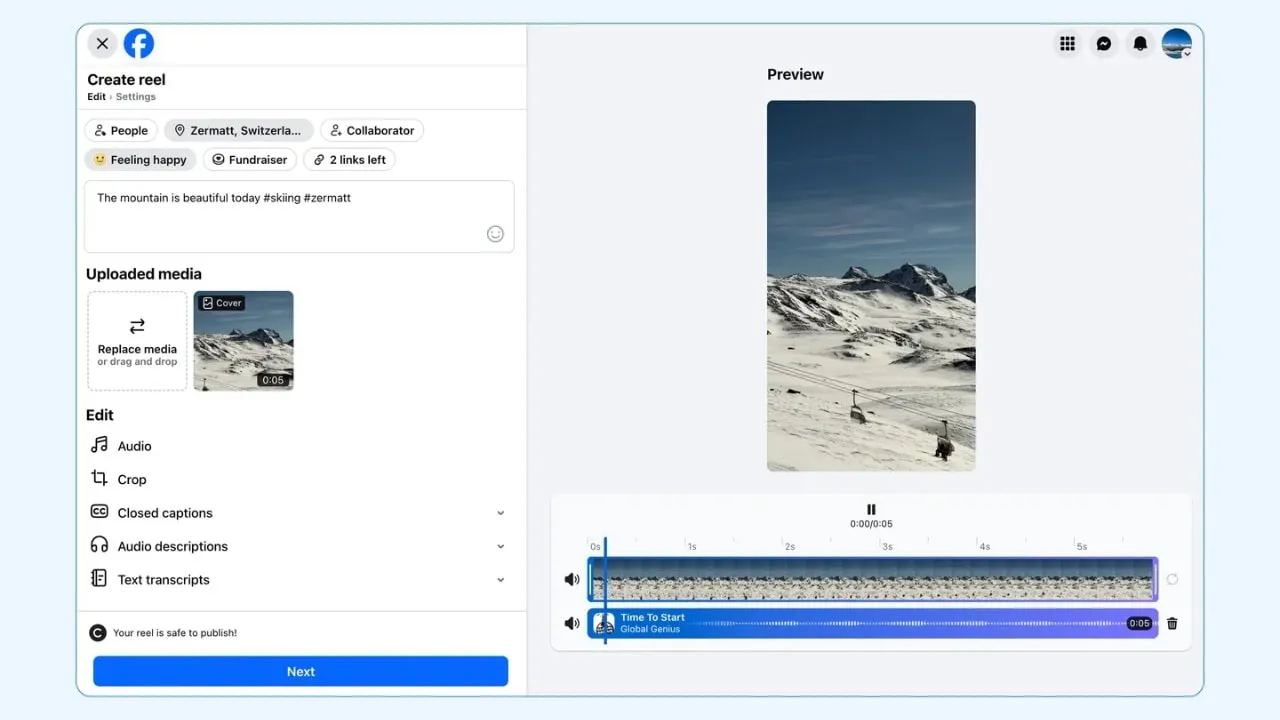
The web version adds several capabilities suited to larger screens. A redesigned composer for feed posts and Reels now includes full-screen overviews and live previews, letting creators see exactly how content will appear before publishing. Bulk video upload arrived alongside an improved content library and a visual content calendar migrated from Meta Business Suite. Performance insights received an upgrade too, giving creators more detailed analytics across both platforms.
Bulk uploading tools solve a major bottleneck for video producers who batch-produce content ahead of time. Instead of uploading individual video files one by one, creators can now queue multiple files simultaneously, saving hours of administrative work each week. The visual content calendar provides a clear, month-long or week-long roadmap, helping teams coordinate campaigns and maintain a consistent posting schedule across Facebook and Instagram.
Detailed performance insights allow creators to track audience retention, view counts, and engagement metrics with greater precision. Understanding which formats drive the most traffic helps producers refine their strategies and focus on content that resonates with their target demographic. The inclusion of live previews ensures that formatting errors, awkward thumbnail crops, and misaligned text overlays are caught before the content goes live.
Content Protection and Copyright Tools
Content protection, which Meta expanded to Instagram earlier this week, also lives inside the new dashboard. The system lets creators register original uploads so Meta's matching technology can detect when others repost the same content. Creators can then choose to track, hide, credit-tag, or release flagged reposts. Allow lists let them exempt collaborators from automated takedowns.
Intellectual property theft remains a persistent challenge across social media ecosystems, where unauthorized re-uploads often siphon views and revenue away from original creators. By giving users direct control over content matching technology, Meta empowers independent producers to protect their hard work without filing tedious legal copyright notices for every minor infraction. The allow list feature ensures that brand partners, network collaborators, and fan pages approved by the creator can share material without facing accidental penalties.
This automated detection relies on digital fingerprinting, scanning video and image files as they are uploaded to match them against a database of registered original works. When a match occurs, the dashboard notifies the original creator, giving them immediate administrative control over the disputed upload. This transparency helps maintain community trust while reducing the spread of uncredited duplicate media.
Audience Growth and Monetization Features
The dashboard introduces two additional features for audience growth and revenue. Creators can now invite people who viewed their content to become followers directly from the web interface. A dedicated monetization section surfaces information about available earning opportunities, replacing the scattered revenue tools previously spread across multiple Meta surfaces.
Converting casual viewers into loyal followers is essential for long-term channel sustainability, and direct invitation tools simplify this conversion funnel. Instead of relying solely on organic profile visits, creators can prompt engaged viewers to hit the follow button right from the engagement metrics screen. Meanwhile, the centralized monetization hub removes the guesswork from earning money online, clearly displaying eligibility requirements for ad revenue, bonuses, and brand partnerships.
Having a single place to monitor earnings helps creators diversify their income streams and spot new financial opportunities as soon as they become available. In the past, revenue programs were often hidden deep within specific app settings, leading many eligible users to miss out on potential payouts. The new unified dashboard brings financial transparency to the forefront of daily channel management.
Navigation Shifts and Future Integration Plans
For the broader ecosystem, the update also means another navigation shift. Meta previously called this tool Professional Dashboard before renaming it to Creator Dashboard. It split business-focused tools into a separate Business Dashboard.
Meanwhile, Meta Business Suite still exists alongside in-stream controls users can access directly within Facebook and Instagram. The company plans to unify access through a Meta Creator Marketing Hub later this year, but for now, creators must track which features live where.
The Creator Studio companion app remains in limited testing through a waitlist program. AI features, including the creator assistant and AI-drafted comment replies, currently work for creators in the United States, Canada, and India. Meta plans to expand availability to more countries over the coming months.
Navigating these platform updates requires patience as Meta reorganizes its software architecture to better separate commercial enterprise accounts from individual content creators. While the eventual goal is a unified access point through the upcoming Creator Marketing Hub, today's users must adapt to a transitional period where certain legacy tools remain active. Creators should monitor official platform announcements to stay informed as regional rollouts for artificial intelligence features expand beyond the initial launch countries.