Google Wallet Introduces Physical Receipt Scanning on Android
Google Wallet now includes a built-in tool that scans physical receipts on Android devices. The new capability arrived via the Google Play Services v26.40 update, creating a direct method for users to record transactions without typing details manually. When a user captures a paper receipt, the application automatically reads and extracts the total cost, individual purchased items, tax amounts, applied discounts, and the exact time of purchase. Once processed, the scanned paper document transforms into a fully searchable transaction directly inside the mobile app.
This update addresses a long-standing limitation in digital finance applications by bridging the gap between physical cash spending and digital record-keeping. While digital payments automatically log themselves, traditional payment methods historically required separate tracking apps or manual spreadsheets. By bringing physical scanning straight into Google Wallet, the platform offers a unified approach to personal finance management without forcing users to adopt entirely new budgeting software.
How the Receipt Scanner Works Without a Linked Card
A notable aspect of this new tool is that the scanner functions without requiring a linked payment card within the application. This distinction matters because many daily purchases never touch a digital payment method. Bank transfers, cash transactions, and purchases at smaller merchants that issue only paper receipts previously fell completely outside the tracking scope of Google Wallet. Users previously had no built-in way to log these purchases inside the app unless they typed every single detail by hand. Receipt scanning fills that operational gap completely.
By detaching the scanning feature from strict payment card requirements, the app accommodates users who prefer cash or alternative payment rails. Whether paying for a meal at a local diner with paper bills or settling a local market transaction via a peer-to-peer bank transfer, shoppers can now snap a photo and retain a reliable digital copy. This flexibility broadens the utility of Google Wallet beyond simple contactless payments and boarding passes.
How to Set Up and Use the Receipt Scanner in Google Wallet
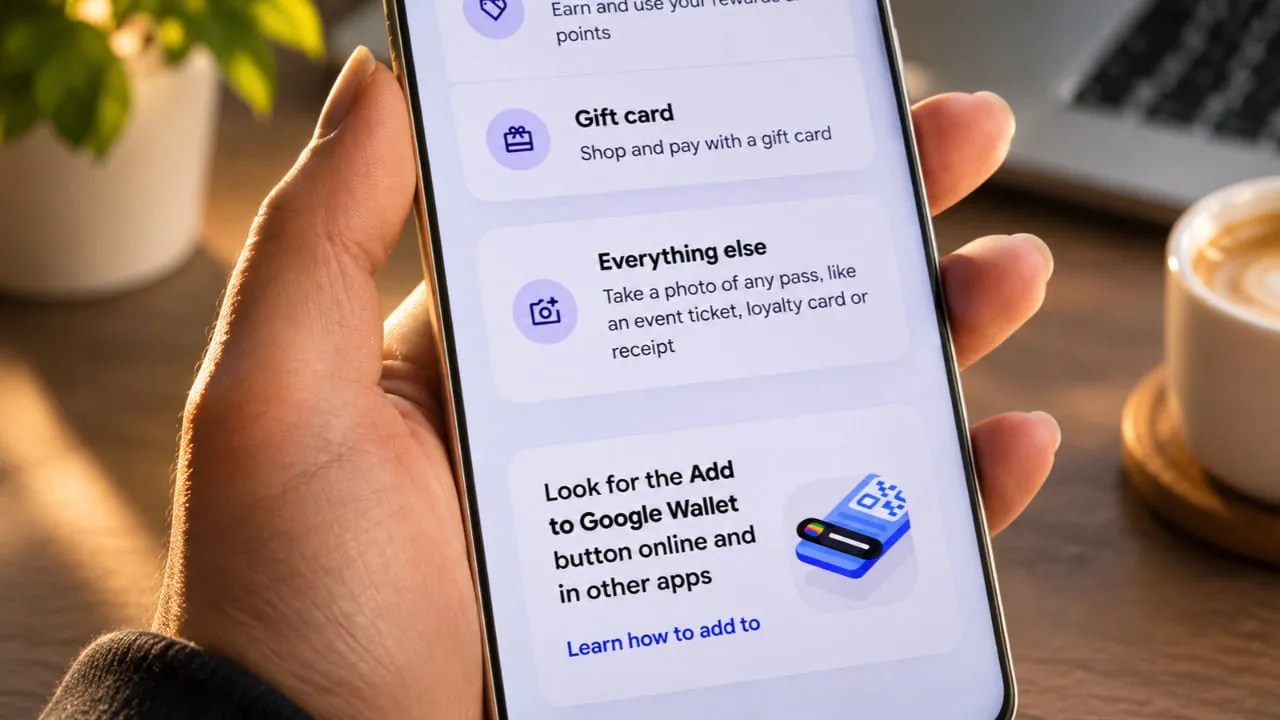
Setting up and using the new feature requires a few specific steps because Google placed the option within a broader category. Users must open the Google Wallet application, tap the plus icon on the screen, and select the option labeled "Everything else" to locate the document and receipt scanner. From there, users can choose to photograph a physical receipt directly using the phone camera or select an existing image file from their device gallery.
After the application scans the image, Google Wallet displays all the extracted details on the screen for user review before final saving. This review step allows shoppers to catch any potential errors made by the optical character recognition system before the data enters their permanent transaction history. Ensuring accurate data entry before saving keeps the searchable transaction log reliable over time.
Current Limitations and Formatting Challenges
The new functionality ships with a practical limitation that users should keep in mind. Because receipt scanning shares underlying code with the general-purpose document scanner built into Google Wallet, the software sometimes misidentifies complex invoices as passes instead of standard transactions. Early testers found that simpler receipts with clear text formatting produce the best and most accurate results. Longer or unusually formatted documents tend to trigger classification errors more frequently.
Users dealing with multi-page receipts or heavily stylized thermal print might need to retake photos or manually verify the extracted fields more carefully. As Google continues to refine the underlying machine learning models through future updates, classification accuracy for complex documents is expected to improve. For now, sticking to well-lit, clearly printed single receipts minimizes scanning errors.
Integration with Gmail Digital Receipts
Google also connects this physical scanning capability to its broader Gmail integration system. Google Wallet already pulls digital receipts and shipping tracking numbers automatically from Gmail for users who enable smart features within their account settings. Physical receipt scanning now complements that existing digital system nicely. Together, the two features give users a centralized record of both online shopping orders and in-store retail purchases.
This dual approach ensures that whether a person buys a product through an e-commerce website or visits a brick-and-mortar storefront, the purchase history eventually consolidates into one application. Minimizing fragmented records helps individuals monitor their spending habits more effectively without juggling multiple apps or checking separate email folders.
Rollout Status and Future Merchant APIs
At the present time, the rollout of the receipt scanner depends heavily on device compatibility and individual Play Services update status. Google has not confirmed whether every user account and geographic region has received access simultaneously. Users running Google Play Services v26.40 or a later version should manually check for the scanning option under the plus menu inside their app.
Earlier this year at the Google I/O developer conference, the company announced a specialized API designed to let merchants send digital receipts directly into Google Wallet. Once that direct system matures and sees widespread adoption, manual scanning will become much less necessary for supported stores. Until that direct merchant integration becomes standard practice everywhere, the phone camera remains the fastest way to turn a paper receipt into a permanent digital record.