Instagram Edits App Introduces New Features for Creators
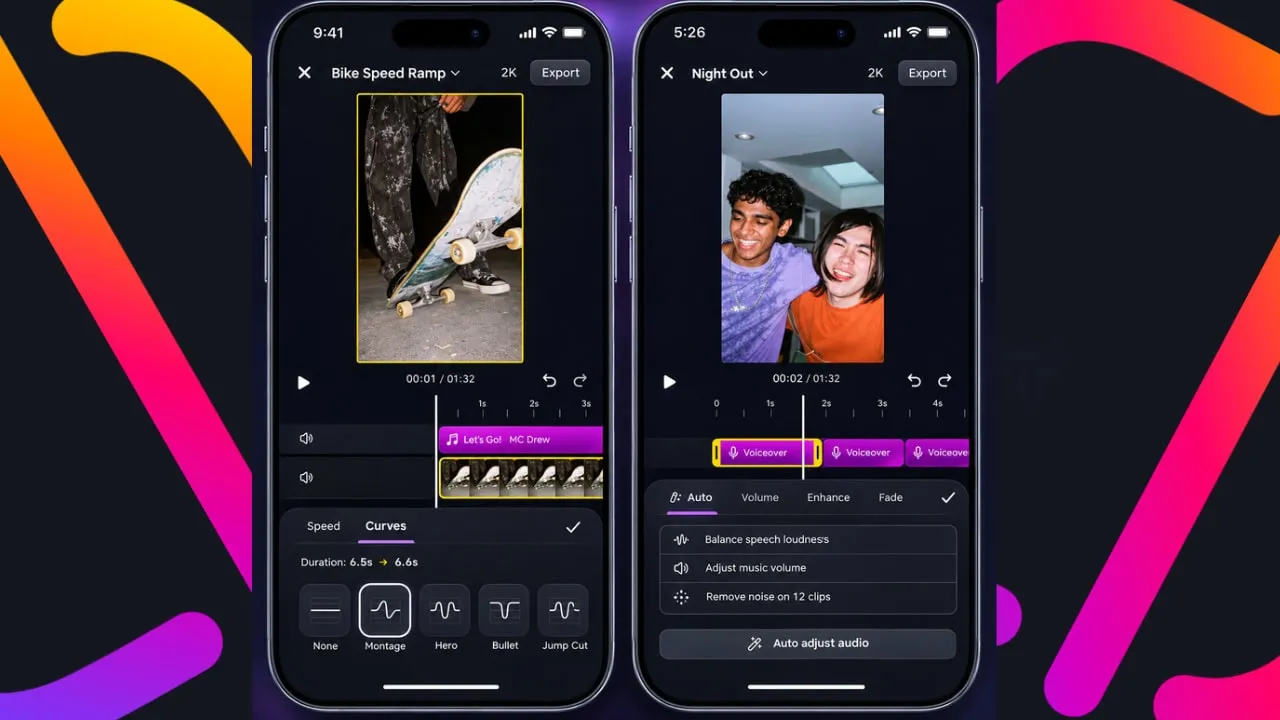
Meta updated its Edits video editing app with three new features for creators. The update adds speed curves for variable playback, automatic audio balancing across video elements, and text animation duration controls. Meta announced the changes through the Creators account on Threads on November 12.
Short-form video content production requires precise tools to keep viewers engaged on platforms like Instagram Reels and TikTok. The Edits application provides a mobile-first environment for creators to assemble, cut, and enhance footage without relying on complex desktop suites. By rolling out updates roughly every two weeks, Meta aims to equip content producers with the capabilities necessary to maintain high production values.
The latest software package addresses several technical bottlenecks that previously slowed down mobile editing workflows. Creators often combine clips shot on different devices, under varying lighting and acoustic conditions. Integrating professional-grade controls directly into a portable app helps bridge the gap between amateur recordings and polished studio broadcasts.
How Custom Speed Curves Work in Instagram Edits
Speed curves give creators frame-level control over playback timing. The feature lets users increase or decrease video playback speed at specific moments within a clip. Edits offers a range of preset speed curve options, so creators select from existing patterns that ramp up or slow down at different points. Additionally, creators build their own custom curves for precise control. This approach mirrors professional editing workflows where filmmakers use speed ramps for dramatic impact, slow-motion transitions, or time-lapse effects. Bringing that control to a mobile app makes it accessible to Reels creators without desktop software.
Variable speed manipulation allows storytellers to emphasize action sequences, comedic timing, or dramatic reveals within a single continuous shot. Manual keyframing of speed changes used to require cumbersome workarounds on mobile devices. Preset options provide a fast starting point for beginners, while custom curves satisfy advanced users who want specific pacing to match background music beats or dramatic pauses.
Mastering speed adjustments helps creators retain viewer attention spans, which remain notoriously short on modern social media feeds. A well-placed speed ramp guides the human eye directly to the focal point of a scene. Integrating this capability into the core application suite reduces the need for third-party utility apps.
Understanding Automatic Audio Balancing in Video Editing
Auto audio balancing addresses a common frustration in multi-clip editing. When creators combine footage from different sources, audio levels often vary dramatically between clips. The new tool automatically levels audio across all video elements, so voiceovers, background music, and ambient sound maintain consistent volume throughout the final video. Because uneven audio is one of the fastest ways to lose a viewer's attention, this feature directly improves content quality.
Sound design often presents the steepest learning curve for new video producers. Sudden spikes in background music can drown out spoken dialogue, rendering a tutorial or vlog difficult to understand. Automated leveling algorithms analyze incoming audio tracks and adjust gain levels dynamically across disparate segments.
Consistency in audio presentation builds professional trust with audiences. When a video maintains an even acoustic profile from start to finish, viewers experience less listening fatigue. This addition eliminates manual slider adjustments for every individual clip cut on the timeline.
Text Animation Duration Controls and Precise Timing
Text animation duration controls round out the update. Creators now define exactly how long text appears in their video, how fast it animates in and out, and how quickly animations loop. Previously, text timing required workarounds. Consequently, this addition gives creators native precision over one of the most commonly used elements in short-form video.
On-screen text plays a critical role in conveying information, especially given that many users watch social media videos with the sound turned off. Captions, titles, and call-out phrases must appear at the exact moment a speaker mentions a key term. Precise duration settings ensure text does not linger awkwardly on screen or disappear before the viewer can finish reading.
Looping animations add visual flair to introductory titles and lower-third graphics. Giving creators direct control over speed and duration parameters allows for tight synchronization with background tracks. This level of customization matches the output expected by modern digital audiences.
Updates to the Inspiration Tab and Personalization
Beyond these editing tools, Meta also updated the Inspiration tab inside Edits. Users now choose which content topics appear more or less frequently in their feed of reference clips. This approach works similarly to Meta's "Your Algorithm" controls on Facebook. However, it focuses specifically on the clips creators browse for ideas rather than their personal social feeds.
Finding fresh concepts drives the creative process for high-volume content producers. The Inspiration tab serves as a curated library of trending styles, transitions, and editing formats. Allowing creators to fine-tune this feed ensures they receive relevant visual suggestions instead of generic templates.
Personalizing the discovery environment saves time during the initial planning phase of video creation. Creators shape their reference feed to match their specific niche, whether that involves lifestyle vlogging, tech reviews, or comedic skits. This tailoring helps keep pace with rapidly shifting internet trends.
Competing in the Mobile Video Editing Market
Meta has shipped Edits updates roughly every two weeks since launch. The app also recently expanded to macOS, which gives creators access to all these features on a larger screen. For Meta, the steady cadence of updates signals a long-term commitment to competing with CapCut, which dominates the mobile video editing space.
The market for accessible video editing software has expanded rapidly alongside the explosive growth of short-form video platforms. Creators demand seamless cross-device workflows that allow them to start a project on a mobile phone and finish it on a desktop computer. Expanding to macOS represents a strategic step toward capturing desktop-adjacent creators.
Maintaining a rapid release schedule shows that software development teams are actively responding to user feedback. As competition intensifies among major technology companies for creator mindshare, utility apps must continually add advanced features. Meta continues positioning Edits as a comprehensive production ecosystem for independent video producers worldwide.