How GPU App Prioritization Came to Desktop GeForce RTX Users
NVIDIA built a feature to let its RTX Spark laptops split GPU resources between apps. Now that same feature is quietly appearing on regular GeForce RTX desktops, and NVIDIA has not said a word about it.
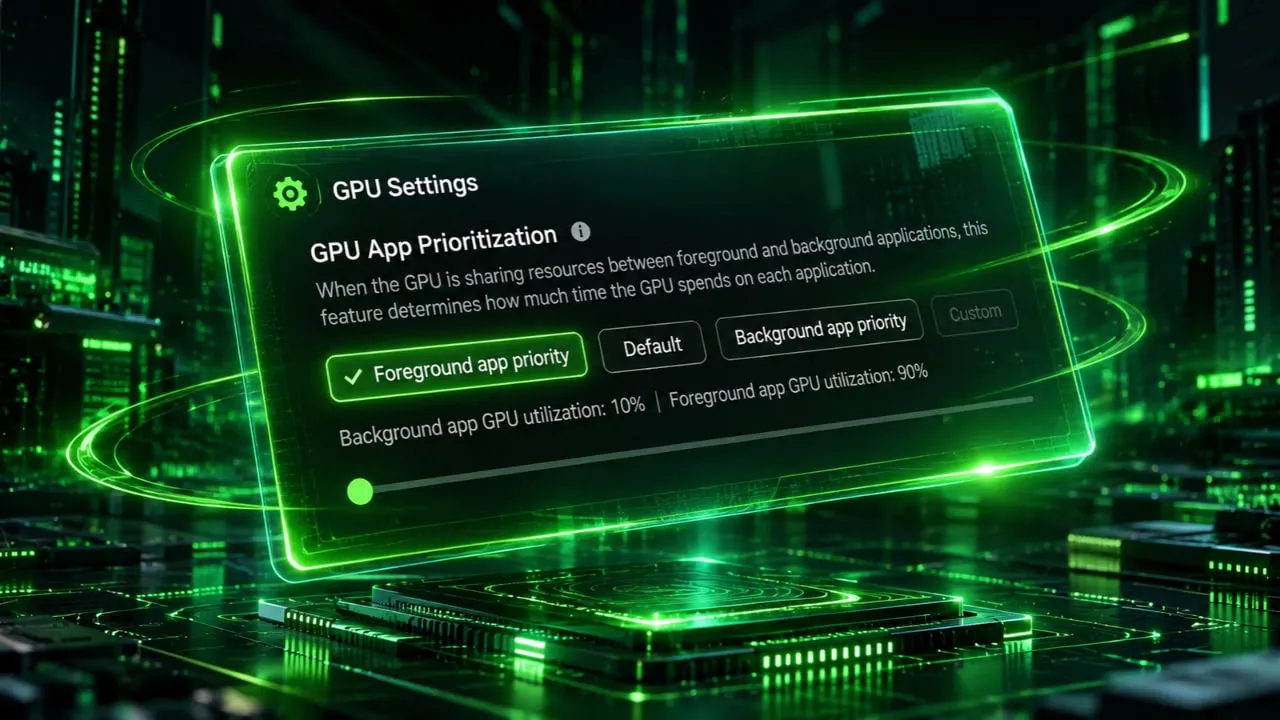
The setting, called GPU App Prioritization, showed up in NVIDIA App version 11.0.9.585. It sits under System, then Advanced in the app settings. However, NVIDIA originally announced this tool exclusively for RTX Spark laptops at launch. Its appearance on standard GeForce cards has caught users off guard.
Software utilities from major hardware manufacturers often receive updates that expand functionality across different product lines. In this case, utility updates manage driver settings, display configurations, and performance metrics. Users rely on these companion tools to extract maximum value from their hardware investments. The quiet arrival of laptop specific tools onto desktop configurations highlights how shared codebases operate in modern driver development.
Solving Resource Allocation Conflicts for Gamers and Creators
The feature solves a practical problem that gamers and creators deal with constantly. When a game runs in the foreground while OBS streams in the background, both fight for the same GPU resources. Traditionally, Windows handles this allocation with no user control whatsoever. GPU App Prioritization changes that by letting users decide exactly how much power goes where.
Multi tasking on a single graphics card historically created bottlenecks when resource heavy applications ran simultaneously. Content creators often stream gameplay, encode video feeds, or generate local artificial intelligence models while running demanding 3D software. Without manual intervention, background processes can stutter or drop frames if the primary game demands full hardware capacity.
Understanding the Four Preset Modes and Custom Sliders
Four preset modes handle most scenarios. The default Standard mode splits resources 80/20, giving 80% to the foreground app and 20% to background tasks. Foreground Priority pushes that to 90/10 for maximum gaming performance while streaming. A Background Priority mode reverses the emphasis for rendering or AI workloads. Additionally, a Custom mode lets users manually adjust the ratio up to 95/5 through a step-by-step slider.
These presets give distinct operational profiles depending on what tasks run simultaneously on the machine. Users focusing purely on frame rates benefit from shifting the primary balance upward. Conversely, those running background computations gain stability by shifting weight away from the active window.
System Requirements and Hardware-Accelerated GPU Scheduling
The feature requires Hardware-Accelerated GPU Scheduling to be enabled in Windows. Without it, the prioritization controls do not appear. This Windows setting offloads some GPU scheduling work from the CPU to the graphics card itself. It has existed since Windows 10 version 2004 but remains disabled by default on many systems.
Hardware-Accelerated GPU Scheduling alters how the operating system manages memory queues and processing loads. By allowing the graphics processor to manage its own memory priorities, overall system latency decreases under heavy loads. Users must navigate the graphics settings menu within the Windows operating system to activate this prerequisite manually.
Uneven Availability Across GeForce RTX Graphics Cards
Availability across GeForce cards is uneven and seemingly random right now. Some users took to the internet and confirmed the option appeared after updating. Some RTX 5080 users also found it in their settings. However, an RTX 5070 Ti owner running the same app version and a hotfix driver saw nothing. One RTX 5080 user reported seeing the 90/10 preset but finding the custom slider blocked entirely. NVIDIA has not confirmed which specific GeForce models support the feature.
This patchy distribution points toward an accidental inclusion rather than a structured market release. Software deployment pipelines occasionally bundle experimental code or features destined for specific hardware tiers into universal installer packages. Engineers evaluate performance across varied architectures before authorizing broad public deployment.
Speculation on Accidental Leaks Versus Quiet Testing
The inconsistency suggests this may not be an intentional rollout. It could be leftover code from the RTX Spark implementation that leaked into the broader NVIDIA App update. Alternatively, NVIDIA could be quietly testing compatibility before a formal announcement. Either way, the company has stayed completely silent about GeForce support.
Technology firms routinely test upcoming capabilities within public software builds to gather telemetry and stability data. While silence from corporate communication channels frustrates enthusiasts seeking clear upgrade paths, quiet deployments help engineering teams isolate bugs before official documentation goes live.
Practical Implications for Streamers and AI Workflows
For streamers and content creators, the implications are significant if NVIDIA makes this official. Manually controlling GPU allocation between a game and encoding software eliminates guesswork. Instead of hoping Windows balances resources fairly, users set their own priority and move on. The feature also matters for AI workflows, where a local model might run alongside creative software on the same GPU.
Running local language models or image generation tools alongside heavy graphical applications demands strict hardware management. Giving users direct power over core thread distribution reduces the risk of application crashes or severe input lag during intense computational tasks.
How to Check Your System for GPU App Prioritization
Anyone curious can update their NVIDIA App and check under System, then Advanced. If the option appears, enabling Hardware-Accelerated GPU Scheduling in Windows graphics settings may be necessary first. If it does not show up, there is no workaround yet. NVIDIA has not confirmed whether this feature will formally extend to all GeForce RTX owners.
Users waiting for official confirmation should monitor software release notes accompanying upcoming driver patches. Attempting forced workarounds or unauthorized file modifications risks destabilizing the graphics driver environment. Patience remains the safest course until corporate representatives issue official guidance regarding desktop compatibility.