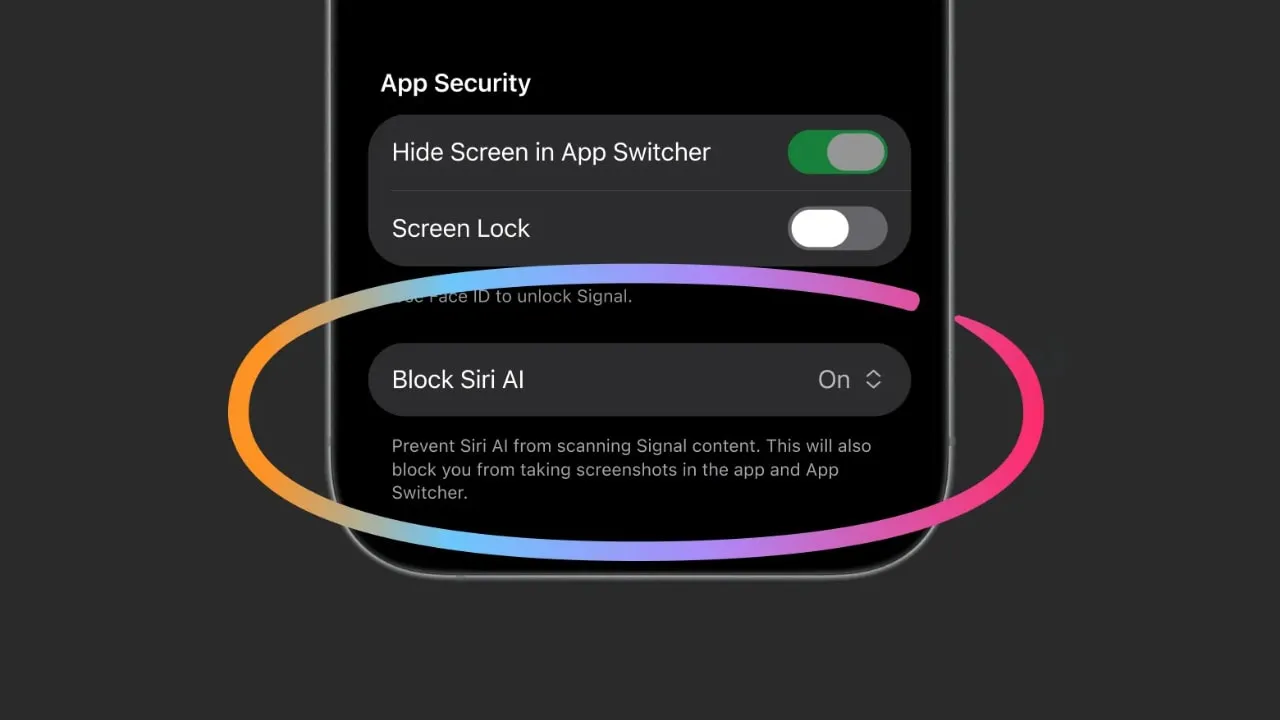
Signal has begun blocking screenshots on both Android and iOS, a move announced on Friday that targets what the company describes as an "existential threat" posed by AI agents embedded in modern operating systems.
Why Signal Is Restricting Screenshots
Signal president Meredith Whittaker explained in a blog post that Windows, Android, macOS and iOS are all adding "agentic AI systems" that can automatically scan on-screen content. She warned that these agents can capture, store and forward sensitive data to local databases or remote servers without Signal's knowledge. "Your sensitive data is being captured, stored, and made accessible to whatever local database or remote server an OS-level AI agent is using at that moment," Whittaker wrote. "All of this is outside of Signal's control once the data has been captured."
How the Screenshot Block Works on Mobile
On Android, the new "Screen Security" feature overlays a blue privacy screen that bears the Signal logo whenever a screenshot attempt is detected. The overlay obscures the chat view and prevents the operating system from saving an image of the conversation. On iOS, the feature hides the app's content in the app switcher, making it invisible to the thumbnail that iOS normally displays when a user switches between apps.
Both mechanisms are enabled by default in the latest Signal updates for Android and iOS. Users who prefer to keep the screenshot capability can turn the setting off in the app's privacy preferences, but Whittaker cautioned that doing so would "break our privacy guarantees." She also admitted the approach is "incomplete," because AI agents could still access data through other channels such as accessibility services, push-notification content or background analysis.
Signal's Earlier Battle With AI-Powered Screenshot Tools
The mobile rollout builds on a fight that began in May 2025 when Signal blocked Microsoft's Recall feature on Windows. Recall periodically captured screenshots of the user's screen and fed the images to an AI model for searchable indexing. Signal responded by applying a DRM flag to its Windows client, similar to the protection Netflix uses to prevent viewers from screenshotting streamed video. That flag was shipped as enabled by default for all Windows 11 users, effectively disabling Recall for Signal users.
Broader Context: AI Agents in Operating Systems
Whittaker has been vocal about the risks of AI agents that operate with elevated permissions. In January 2026 she told Bloomberg at Davos that AI agents with root-access permissions were "perilous" for secure applications. Later, at the TechBBQ conference in Copenhagen, she described how asking an AI assistant to summarize screen content triggers a screenshot of the foreground app, potentially exposing encrypted Signal messages.
"We will not be able to make privacy promises that we as developers who are independent can keep," she said, "because the water we swim in will have been poisoned."
Recent Findings That Prompted Action
The timing of Signal's mobile rollout follows a TechJuice investigation that showed Meta's Muse AI assistant could read encrypted Signal messages by exploiting Android push-notification permissions. Whittaker called Meta's approach "technologically reckless." In response, Apple tightened Full Disk Access controls in the macOS 27.3 beta 2 release after separate reports demonstrated that Muse could read iMessage content through similar permission abuse.
What the Restriction Means for Users
For everyday Signal users, the new screenshot block means that the app's content will no longer be captured by the operating system's built-in screenshot function while the app is in the foreground. The privacy screen on Android and the hidden thumbnail on iOS are both designed to keep chat bubbles, images and attachments out of any AI-driven analysis pipeline that relies on visual data.
Users who need to capture a screenshot for legitimate reasons, such as preserving a receipt or reporting abuse, can still do so by disabling the feature in the privacy settings. However, the company's documentation makes clear that turning the protection off removes the technical guarantee that Signal can offer against AI-level data harvesting.
What Signal Is Asking From OS Vendors
In the same blog post, Signal urged operating-system providers to give independent developers robust tools to block AI-level access to sensitive data. The statement reads: "It's ultimately up to companies like Microsoft to ensure that their platforms remain a suitable foundation for privacy-preserving applications like Signal." The call to action is aimed at Microsoft, Google, Apple and other platform owners that control the low-level APIs used by AI assistants.
Potential Limitations and Future Steps
While the screenshot block is a concrete technical measure, Whittaker acknowledged that it does not address every vector through which AI agents could reach application data. For example, AI assistants that have accessibility-service permissions can still read screen text, and background services that monitor clipboard activity remain a possible leakage path.
Signal's development team is reportedly working on additional mitigations, such as tighter sandboxing of the app's memory and stricter enforcement of Android's "no-screenshot" flag for secure windows. The company has also signaled that it will continue to lobby OS vendors for built-in privacy controls that can be toggled by developers on a per-app basis.
Impact on the Wider Messaging Ecosystem
Signal's stance positions it as a "canary in the coal mine" for privacy-focused applications. If operating-system providers do not provide adequate safeguards, other encrypted messaging services, Telegram, WhatsApp, iMessage, could face similar exposure to AI-driven data collection. The broader ecosystem may see a wave of developers adopting similar DRM-style flags or requesting platform-level privacy APIs.
Regulators in the European Union and the United States have begun to examine the privacy implications of AI agents that operate at the OS level. While no specific legislation has yet mandated screenshot protection, the growing scrutiny could accelerate the adoption of privacy-by-design features across mobile and desktop platforms.
How to Check If the Feature Is Active
After updating Signal from the Google Play Store or Apple App Store, users can open the app's Settings menu, navigate to "Privacy & Security," and look for the "Screen Security" toggle. When enabled, Android will display the blue privacy overlay on any screenshot attempt, and iOS will hide the app's preview in the multitasking view. A brief tutorial video is included in the app's update notes to demonstrate the behavior.
What to Watch For Next
Signal has not announced a specific timeline for additional privacy enhancements, but the company indicated that future updates will focus on "blocking AI-level access beyond visual capture." Observers will be watching for any statements from Microsoft, Google and Apple regarding new APIs that allow developers to opt-out of AI-driven data collection.
In the meantime, privacy advocates recommend that users keep their operating-system versions up to date, review app permissions regularly, and consider disabling AI assistants that have broad access to screen content.