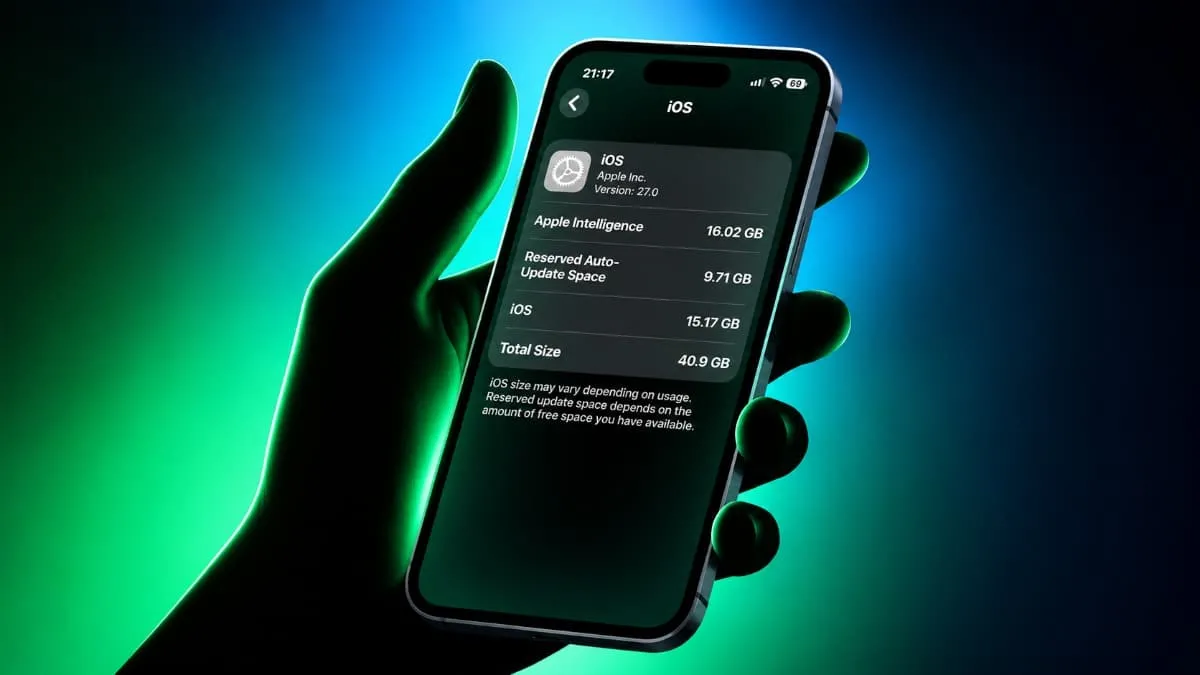
Understanding Apple Intelligence Storage Usage on iOS 27
Recent software upgrades from Apple have brought advanced artificial intelligence tools to mobile devices, but this technological shift comes with a heavy footprint on device memory. Owners of supported smartphones are finding that the iOS 27 update requires a substantial amount of room just to host the new system capabilities. According to user reports, Apple's AI features are using around 15GB of internal storage on some devices, with figures ranging from 9GB to 16GB.
This rapid consumption of capacity has surprised many consumers who expected software updates to streamline performance rather than crowd hardware resources. The problem is particularly frustrating for people using iPhones with 128GB of storage, where the operating system and AI features can take up a significant portion of the available space. For example, some iPhone 16 users with 128GB models have reported that iOS, Apple Intelligence, and reserved system storage together occupy around 30% of their device's capacity.
Background context on modern mobile operating systems reveals that running artificial intelligence directly on local hardware requires massive neural network models. Unlike cloud-based processing, on-device intelligence relies on pre-loaded data files that stay on the smartphone so the processor can execute tasks instantly without needing an active internet connection. Apple introduced major improvements to Apple Intelligence with iOS 27, including more advanced AI features and an upgraded Siri, which naturally demand more physical space inside the hardware.
Why On-Device AI Models Require So Much Room
Consumers often wonder why a software feature needs gigabytes of dedicated space when traditional applications take up far less room. Apple's official support documentation says the new Apple Intelligence can require up to 14GB on certain supported devices, while other compatible models require up to 8GB. These files consist of specialized weights and parameters that teach the smartphone how to understand natural language, generate text, and process images locally.
The company also notes that storage usage may temporarily increase during or shortly after an update as new AI models are downloaded and older ones are removed. Despite this built-in expectation of fluctuating capacity demands, some users are reporting higher figures, with Apple Intelligence taking up as much as 16GB. This discrepancy can push already crowded devices past their comfort zone, leaving very little room for personal photos, videos, and standard applications.
Another layer of frustration involves regional availability. Some users have also reported high storage usage despite being unable to access certain Apple Intelligence features in their regions. When the background files download automatically during an operating system installation, the hardware absorbs the storage cost even if the user cannot legally or technically interact with the tools where they live.
The Impact on 128GB iPhone Models and Regional Restrictions
The rise of high-capacity software features creates distinct challenges for entry-level hardware configurations. When a device ships with 128GB of total capacity, the operating system, pre-installed utilities, and required system reserves already consume a baseline percentage. Adding another 15GB for artificial intelligence leaves the consumer with significantly less freedom to manage their personal files.
Some affected users have tried disabling Apple Intelligence or Siri to recover the occupied space. However, reports suggest that simply turning off these features does not always immediately remove the downloaded AI files from the storage directory. The operating system often retains the data in case the user decides to reactivate the tools later.
Other consumers have considered changing their Apple Account region to bypass local restrictions, but this can create additional problems. Apple may require users to cancel subscriptions or spend their remaining account balance before switching to another region. Because of these administrative hurdles, changing account settings is rarely a quick or practical solution for freeing up space.
How to Check Your Device Storage and Identify AI Consumption
Before attempting any workarounds, device owners should verify exactly how much room the system files are occupying. Users can check how much space Apple Intelligence occupies by opening Settings, selecting General, and tapping iPhone Storage. This menu breaks down utilization by category, showing whether the operating system or specific bundles are driving up the total numbers.
Monitoring this screen after a software update helps consumers understand whether their device is experiencing normal background cleanup or an unusually high storage burden. Apple has not announced a specific software fix for the higher storage figures reported by some iOS 27 users, meaning manual inspection remains the primary way to track the issue.
However, its official documentation confirms that Apple Intelligence requires considerable local storage and that usage can temporarily increase after software updates. Knowing what to look for prevents unnecessary panic when a device temporarily balloons in capacity right after installation.
Workarounds for Recovering Storage Space on iOS 27
Fortunately, some users have discovered a simpler workaround that does not require changing their Apple Account settings or performing a factory reset. According to reports shared on Reddit, changing Siri's language can significantly reduce the storage occupied by Apple Intelligence. Users have reported success after switching Siri from US or UK English to another English variant, such as Canadian, Irish, South African, or New Zealand English.
To try the workaround, open Settings, navigate to Apple Intelligence & Siri, and select Language. Choose a different English variant, such as English (South Africa), and restart the iPhone. GSMArena tested the workaround using South African English and reported that Apple Intelligence's storage usage dropped to approximately 100MB after restarting the device.
Ios27 Found a way to remove apple intelligence taking up few precious GB byu/Sea_Supermarket1328 inios
While this trick successfully purges the large asset files, the method is not guaranteed to work on every iPhone or iOS version. Changing Siri's language can also temporarily disable some Apple Intelligence features, particularly when the Siri language no longer matches the device language. Users who rely on Apple's AI features should consider this before changing their settings, as losing assistant functionality might outweigh the benefit of gaining a few gigabytes of free space.
What Comes Next for Apple Intelligence Storage Management
As consumers continue to navigate storage constraints on modern smartphones, the pressure mounts on hardware manufacturers to provide better user controls. It remains unclear whether Apple will introduce additional controls to help users manage the storage occupied by downloaded AI models directly from the settings menu. Until an official patch arrives, users must weigh the benefits of advanced local processing against the physical cost those models inflict on limited device memory.
For now, changing Siri's language may help some users recover storage, although it can affect the availability of AI features. Observers and tech specialists advise watching for future point releases of iOS 27 that might alter how background machine learning packages are handled on entry-level hardware configurations.